
Django Tutorial
Installation & Setup
Let's start by installing Django and create our project. For this tutorial we will be using PyCharm. You can install the community edition for free. Once installed open a terminal in pycharm:
- First install Django:
- Add the app to settings.py
- We will be using a folder structure to separate files for easier management:
- Enable Templates & Static files in settings.py:
- Add allowed Hosts to settings.py:
- Create security settings in setting.py (at the end of the file after the last line:
- Add CSRF Tokens:
- Create Views for pages in views.py
- Create a file called urls.py and add URLs to it (use namespace if you plan on adding more apps later):
- Create database migrations
    # Install Django
    pip install django

    # Create project
    django-admin startproject daemons_code_library

    cd daemons_code_library

    # Create app
    python manage.py startapp code_library
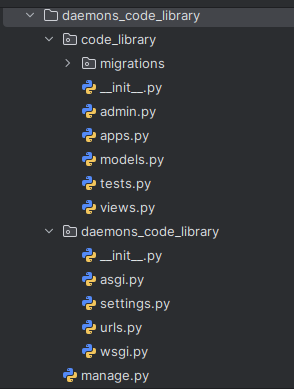
The folder structure should now look like this:
            INSTALLED_APPS = [
            'django.contrib.admin',
            'django.contrib.auth',
            'django.contrib.contenttypes',
            'django.contrib.sessions',
            'django.contrib.messages',
            'django.contrib.staticfiles',
            'code_library', <-- add this
        ]
    cd code_library
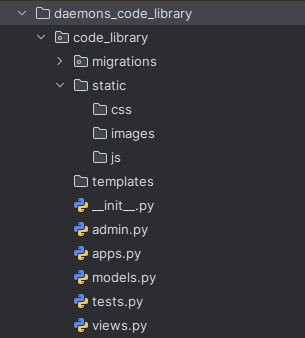
    mkdir templates static
    mkdir static/css static/js static/images
The folder structure should now look like this:
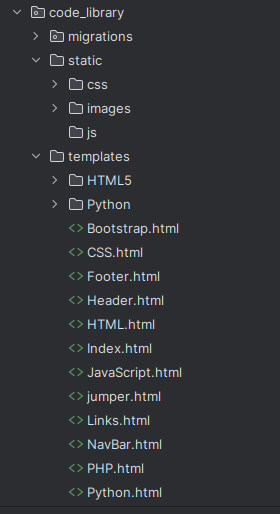
Move the files as follows: • HTML/PHP files (like index.php, header.php, footer.php, HTML.php, etc.) → code_library/templates/ • Style.css → code_library/static/css/Style.css • Script.js → code_library/static/js/Script.js • Images → code_library/static/images/ • Other folders (HTML5, CSS, PHP, Django, Javascript) → code_library/templates/html5/basics1.html ect.
The folder structure should now look like this:
    import os <-- add this

    BASE_DIR = Path(__file__).resolve().parent.parent

    # Templates
    TEMPLATES = [
        {
            'BACKEND': 'django.template.backends.django.DjangoTemplates',
            'DIRS': [BASE_DIR / "code_library" / "templates"], <-- add this
            'APP_DIRS': True,
            'OPTIONS': {
                'context_processors': [
                    'django.template.context_processors.debug',
                    'django.template.context_processors.request',
                    'django.contrib.auth.context_processors.auth',
                    'django.contrib.messages.context_processors.messages',
                ],
            },
        },
    ]

    # Static files
    STATIC_URL = '/static/'
    STATICFILES_DIRS = [BASE_DIR / "code_library" / "static"]  <-- add this
    find ALLOWED_HOSTS = [}
    ALLOWED_HOSTS = ["yourdomain", "127.0.0.1", "localhost"] <-- add this
    # ==============================
    # Django Security Settings
    # ==============================

    # Use HTTPS everywhere
    SECURE_SSL_REDIRECT = True  # Redirect all HTTP → HTTPS
    SECURE_HSTS_SECONDS = 31536000  # 1 year (adjust if testing)
    SECURE_HSTS_INCLUDE_SUBDOMAINS = True
    SECURE_HSTS_PRELOAD = True

    # Protect against content sniffing
    SECURE_CONTENT_TYPE_NOSNIFF = True

    # Prevent XSS
    SECURE_BROWSER_XSS_FILTER = True  # Some browsers (older)
    X_FRAME_OPTIONS = "DENY"  # Prevent clickjacking (use "SAMEORIGIN" if you need iframes)

    # CSRF Protection
    CSRF_COOKIE_SECURE = True
    CSRF_COOKIE_HTTPONLY = True

    # Session / Cookie Security
    SESSION_COOKIE_SECURE = True
    SESSION_COOKIE_HTTPONLY = True
    SESSION_EXPIRE_AT_BROWSER_CLOSE = True

    # Referrer Policy (optional, but good practice)
    SECURE_REFERRER_POLICY = "strict-origin-when-cross-origin"
    find CSRF_COOKIE_HTTPONLY = True  and below it insert this line:
    CSRF_TRUSTED_ORIGINS = ["https://yourdomain", "https://127.0.0.1", "localhost"] <-- add this
    from django.shortcuts import render

    def index(request):
        return render(request, "index.html")

    def html_page(request):
        return render(request, "HTML.html")

    def css_page(request):
        return render(request, "CSS.html")

    def php_page(request):
        return render(request, "PHP.html")

    def python_page(request):
        return render(request, "Python.html")
    from django.urls import path
    from . import views

    app_name = "code_library"   # 👈 namespace for this app

    urlpatterns = [
        path('', views.index, name="home"),
        path('html/', views.html_page, name="html"),
        path('css/', views.css_page, name="css"),
        path('php/', views.php_page, name="php"),
        path('python/', views.python_page, name="python"),
    ]
In daemons_code_library/urls.py, add the following:
    from django.contrib import admin
            from django.urls import path, include <-- add 'include' to this line

    urlpatterns = [
        path('admin/', admin.site.urls),
        path('', include('code_library.urls', namespace="code_library")), <-- add this
    ]
    python manage.py makemigrations
    python manage.py migrate
This is the basic setup to get Django running. Only thing left to do is run the server:
python manage.py runserver
You can now access your page on: http://127.0.0.1:8000 or http://localhost:8000
Simple Admin Panel:
Django has a simple admin panel built-in to create users ect. We will create a simple e-commerce panel:
Follow above steps and create the following:
- project: ecommerce_admin
- app: products
- add app to settings.py
- Create the Product model in products/models.py
- Create Register Product in admin.py
- Create CRUD Views in products/views.py
- Create Product Form in products/forms.py
- Set Up URLs in ecommerce_admin/urls.py
- Create a templates folder inside your app and add:
- templates/products/product_list.html
- templates/products/product_form.html
- templates/products/product_confirm_delete.html
- templates/login.html
- Create database migrations
- Create superuser
        from django.db import models

        class Product(models.Model):
        name = models.CharField(max_length=200)
        description = models.TextField(blank=True)
        price = models.DecimalField(max_digits=10, decimal_places=2)
        stock = models.PositiveIntegerField(default=0)
        created_at = models.DateTimeField(auto_now_add=True)

        def __str__(self):
            return self.name
        from django.contrib import admin
        from .models import Product

        @admin.register(Product)
        class ProductAdmin(admin.ModelAdmin):
            list_display = ('name', 'price', 'stock', 'created_at')
            search_fields = ('name',)
            list_filter = ('created_at',)
            ordering = ('-created_at',)
        from django.shortcuts import render, redirect, get_object_or_404
        from django.contrib.auth.decorators import login_required
        from .models import Product
        from .forms import ProductForm

        @login_required
        def product_list(request):
            products = Product.objects.all()
            return render(request, 'products/product_list.html', {'products': products})

        @login_required
        def product_create(request):
            if request.method == "POST":
                form = ProductForm(request.POST)
                if form.is_valid():
                    form.save()
                    return redirect('product_list')
            else:
                form = ProductForm()
            return render(request, 'products/product_form.html', {'form': form})

        @login_required
        def product_update(request, pk):
            product = get_object_or_404(Product, pk=pk)
            if request.method == "POST":
                form = ProductForm(request.POST, instance=product)
                if form.is_valid():
                    form.save()
                    return redirect('product_list')
            else:
                form = ProductForm(instance=product)
            return render(request, 'products/product_form.html', {'form': form})

        @login_required
        def product_delete(request, pk):
            product = get_object_or_404(Product, pk=pk)
            if request.method == "POST":
                product.delete()
                return redirect('product_list')
            return render(request, 'products/product_confirm_delete.html', {'product': product})
        from django import forms
        from .models import Product

        class ProductForm(forms.ModelForm):
            class Meta:
                model = Product
                fields = ['name', 'description', 'price', 'stock']
        from django.contrib import admin
        from django.urls import path
        from products import views as product_views
        from django.contrib.auth import views as auth_views

        urlpatterns = [
            path('admin/', admin.site.urls),
            path('login/', auth_views.LoginView.as_view(template_name='login.html'), name='login'),
            path('logout/', auth_views.LogoutView.as_view(), name='logout'),

            path('', product_views.product_list, name='product_list'),
            path('create/', product_views.product_create, name='product_create'),
            path('update/<int:pk>/', product_views.product_update, name='product_update'),
            path('delete/<int:pk>/', product_views.product_delete, name='product_delete'),
    ]
            <h1>Products</h1>
            <a href="{% url 'product_create' %}">Add Product</a>
            <a href="{% url 'logout' %}">Logout</a>
            <table>
                <tr>
                    <th>Name
                    </th>
                    <th>Price
                    </th><th>Stock
                    </th>
                    <th>Actions
                    </th>
                </tr>
                {% for product in products %}
                <tr>
                    <td>{{ product.name }}</td>
                    <td>${{ product.price }}</td>
                    <td>{{ product.stock }}</td>
                    <td>
                        <a href="{% url 'product_update' product.pk %}">Edit</a>
                        <a href="{% url 'product_delete' product.pk %}">Delete</a>
                    </td>
                </tr>
                {% endfor %}
            </table>
            <h1>{{ form.instance.pk|yesno:"Edit Product,Add Product" }}</h1>
            <form method="post">
                {% csrf_token %}
                {{ form.as_p }}
                <button type="submit">Save</button>
            </form>
            <a href="{% url 'product_list' %}">Back</a>
            <h1>Delete Product</h1>
            <p>Are you sure you want to delete "{{ product.name }}"?</p>
            <form method="post">
                {% csrf_token %}
                <button type="submit">Yes, delete</button>
            </form>
            <a href="{% url 'product_list' %}">Cancel</a>
            <h1>Login</h1>
            <form method="post">
                {% csrf_token %}
                {{ form.as_p }}
                <button type="submit">Login</button>
            </form>
        python manage.py makemigrations
        python manage.py migrate
python manage.py createsuperuser
Just follow the prompts for username, email (if required) and password
Now you have a fully functional admin panel.
You can now access your panel on: http://127.0.0.1:8000/admin or http://localhost:8000/admin
To login, use the credentials you created earlier.
Django Quickstart Script
Here is a simple script to install Django and create a simple website:
Django Quickstart